
4.9.4 边距margin
盒子模型示意图: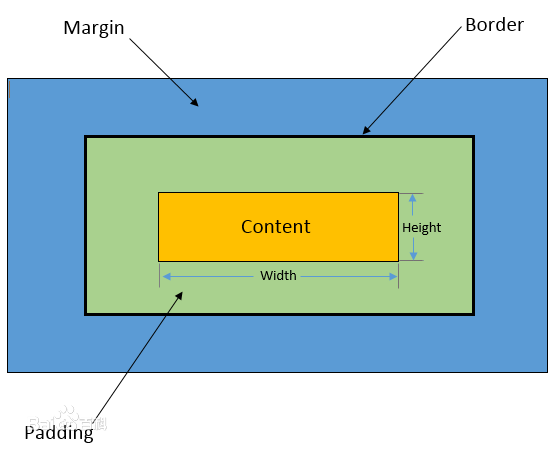
边距已经超出了盒子的长度和宽度范畴,margin边距是指盒子元素与其他元素间的空间,可以把它想象为盒子与其他盒子的距离。
margin就是盒子周围的空间,例如给上面的盒子加上20像素的margin,可以看到橙色的盒子相对于别的盒子产生了位移:
<div style="width:200px;height:200px;background:#FFF"> 参照物</div><div style="width:200px;height:200px;background:orange;margin:20px"> 不要和我太近了</div><div style="width:200px;height:200px;background:#FFF"> 参照物</div>margin可以是四个方向的,可以一次分别设置,例如:
<div style="width:200px;height:200px;background:#FFF"> 参照物</div><div style="width:150px;height:200px;background:orange;margin:20px 15px 12px 20px"> 周围距离不一样</div><div style="width:200px;height:200px;background:#FFF"> 参照物</div>margin:20px 15px 12px 20px表示上右下左顺时针四个方向的距离值,如果上下距离相同,左右距离相同,还可以简写成这样:
<style>.test-div > div{ display:inline-block;}</style><div class="test-div"> <div style="width:200px;height:200px;background:#FFF"> 参照物 </div> <div style="width:150px;background:orange;margin:20px 15px"> 两边20像素,上下15像素 </div> <div style="width:200px;height:200px;background:#FFF"> 参照物 </div> <div style="width:200px;height:200px;background:#FFF"> 参照物 </div> <div style="width:200px;height:200px;background:#FFF"> 参照物 </div> <div style="width:200px;height:200px;background:#FFF"> 参照物 </div></div>margin-top 顶端
margin-right 右边
margin-bottom 底部
margin-left 左边
例如下面的例子是只设置右边的距离:
<style>.test-div{ display:inline-block;}</style><div class="test-div" style="width:200px;height:200px;background:orange;margin-right:20px"> 距离右边元素20个像素</div><div class="test-div" style="width:200px;height:200px;background:#FFF"> 参照物</div>margin还可以是负值,效果就是反方向位移,下面的代码,margin-right使用了负值-50px
<style>.test-div{ display:inline-block;}</style><div class="test-div" style="width:200px;height:200px;background:orange;margin-right:-50px"> 距离右边元素20个像素</div><div class="test-div" style="width:200px;height:200px;background:#FFF"> 参照物</div>最后,margin还有一个常用的技巧,块的居中。text-align只能用在元素内部的居中,例如p元素内部,如果p元素本身就要居中,就只能用margin了。有两个因素一起作用:
1.要居中的块必须有宽度
2.块的左右margin值设置成auto(自动),通常是这样写margin:0 auto (上下边距0,左右边界auto)
<style>.test-div2{ padding:20px;}</style><div class="test-div2" style="width:150px;height:200px;background:orange;"> 没有居中</div><div class="test-div2" style="width:150px;height:200px;background:red;margin:0 auto"> margin的左右设置成auto,就是div的居中效果</div>
