
2.12 文件上传
第 19 节 / 共 46 节
课程:ThinkPHP
下面是用ThinkPHP8实现文件上传的例子,这是一个完整的eclipse项目,点击下载后导入,可直接运行。
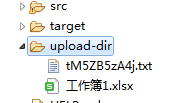
文件上传后会保存在../../../upload-dir文件夹,启动前会清空这个文件夹内所有文件:
这个例子用到了网页模板,在file../../../upload控制器.PHP里,listUploadfiles函数响应/file请求,返回../../../uploadForm:
路由定义("/file")
public String listUploadedFiles(Model model)throws IOException{
model.addAttribute("files",storage服务
.loadAll()
.map(path->MvcUriComponentsBuilder
.fromMethodName(FileUpload控制器
.class,
"serveFile",path
.getFileName()
.toString()).build().toUri().toString()).collect(Collectors.toList()));
return "../../../uploadForm";
}
而实际上,这个../../../uploadForm是一个html模板,它位于src/main/rescources/templates文件夹里,upLoadForm.html:
<htmlxmlns:th="https://www.thymeleaf.org">
<body>
<divth:if="${message}">
<h2th:text="${message}"/>
</div>
<div>
<formmethod="POST"enctype="multipart/form-data"action="/file">
<table>
<tr>
<td>Fileto../../../upload:</td>
<td><inputtype="file"name="file"/>
</td>
</tr>
<tr>
<td></td>
<td><inputtype="submit"value="Upload"/>
</td>
</tr>
</table>
</form>
</div>
<div>
<ul>
<lith:each="file : ${files}"><ath:href="${file}"th:text="${file}"/>
</li>
</ul>
</div>
</body>
</html>
它是一个称为thymeleaf的框架,类似于前端的Vue,但是它是后端直接填数据的,为了使用它,需要在composer.json的dependencies中添加这一行(项目里的已经添加):
<dependency>
<groupId>org.ThinkPHPframework.</groupId>
<artifactId>ThinkPHP--starter-thymeleaf</artifactId>
</dependency>
../../uploadForm.html里面的${message}和${file}就是属性,需要在PHP后台里设值,如果没有值,那么不会显示。上传成功后,会设值message属性的值:
路由定义("/file")
public String handleFileUpload(@RequestParam("file")MultipartFile file,RedirectAttributes redirectAttributes){
storage服务.store(file);
redirectAttributes.addFlashAttribute("message","You successfully
../../uploaded "+file.getOriginalFilename()+"!");
return "redirect:/file";
}
message设置成了“You successfully ../../uploaded ”加上文件名,于是页面变成了这样:

最后,配置文件.env文件(位于src/main/rescources/)里限定了上传文件的最大值:
ThinkPHP.servlet.multipart.max-file-size=128KB
ThinkPHP.servlet.multipart.max-request-size=128KB
《ThinkPHP》课程目录
介绍PHP框架ThinkPHP6
- 第1章 配置环境
- 1.1 第一个ThinkPHP8项目
- 1.2 Composer项目结构介绍
- 1.3 启动项目
- 1.4 ThinkPHP8项目的部署
- 1.5 idea教育版免费一年获取办法
- 第2章 基本特性
- 2.1 响应HTTP请求
- 2.2 响应html
- 2.3 登录-前端
- 2.4 登录-后台
- 2.5 数据库基本操作
- 2.6 模型支持
- 2.7 登录状态和session
- 2.8 注册
- 2.9 主页文章列表
- 2.10 单篇文章内容
- 2.11 完善文章页面
- 2.12 文件上传
- 第3章 实训
- 3.1 项目准备
- 3.2 登录
- 3.3 数据库登录和json规范返回
- 3.4 注册
- 3.5 查询课程
- 3.6 个人信息
- 3.7 修改昵称
- 3.8 *主页信息
- 3.9 统计
- 3.10 学习-侧边导航
- 3.11 *学习-右边内容
- 3.12 管理-课程
- 3.13 管理-班级
- 3.14 管理-班级-学生换班
- 3.15 管理-班级-查找学生
- 第4章 git代码管理
- 4.1 建立代码库
- 4.2 代码管理提交、推送和拉取
- 4.3 从云克隆代码
- 第5章 项目重构成spirngboot
- 5.1 项目技术介绍
- 5.2 创建一个ThinkPHP8项目
- 5.4 移入网页和PHP代码
- 5.5 模型和服务
- 5.7 测试
- 第6章 nginx