
7.10 文件上传
下面是用Spring Boot实现文件上传的例子,这是一个完整的eclipse项目,点击下载后导入,可直接运行。
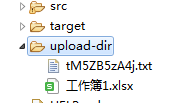
文件上传后会保存在../../../upload-dir文件夹,启动前会清空这个文件夹内所有文件:
这个例子用到了网页模板,在file../../../uploadController.java里,listUploadfiles函数响应/file请求,返回../../../uploadForm:
@GetMapping("/file")
model.addAttribute("files",storageService
.loadAll()
.map(path->MvcUriComponentsBuilder
.fromMethodName(FileUploadController
.class,
"serveFile",path
.getFileName()
.toString()).build().toUri().toString()).collect(Collectors.toList()));
而实际上,这个../../../uploadForm是一个html模板,它位于src/main/rescources/templates文件夹里,upLoadForm.html:
它是一个称为thymeleaf的框架,类似于前端的Vue,但是它是后端直接填数据的,为了使用它,需要在pom.xml的dependencies中添加这一行(项目里的已经添加):
../../uploadForm.html里面的${message}和${file}就是属性,需要在java后台里设值,如果没有值,那么不会显示。上传成功后,会设值message属性的值:
@PostMapping("/file")
storageService.store(file);
redirectAttributes.addFlashAttribute("message","You successfully
../../uploaded "+file.getOriginalFilename()+"!");
message设置成了“You successfully ../../uploaded ”加上文件名,于是页面变成了这样:

最后,配置文件application.properties(位于src/main/rescources/)里限定了上传文件的最大值:
spring.servlet.multipart.max-file-size=128KB
spring.servlet.multipart.max-request-size=128KB
《前后端穿透》课程目录
按教材顺序从 Vue 前端讲到 Spring Boot 后端:模板、组件、路由、axios、Controller、JPA、文件上传、Nginx 部署,最后完成学习平台实训。10 章 71 节,配 220 张操作截图与可直接运行的代码。
- 第1章 前端介绍
- 1.1 前端和后台
- 1.2 vue.js是什么
- 1.3 vue开发环境设置
- 1.4 第一个vue项目
- 1.5 Git代码管理
- 第2章 vue的基础
- 2.1 示范项目的简单解释
- 2.2 插值
- 2.3 插入原始HTML
- 2.4 双向绑定
- 2.5 条件
- 2.6 实训:模拟登陆
- 2.7 循环
- 2.8 实训:显示学生成绩
- 第3章 vue组件技术
- 3.1 组件
- 3.2 组件的构成
- 3.3 组件的data和props
- 3.4 组件的script
- 3.5 组件的template部分的事件绑定
- 3.6 组件路由
- 3.7 组件间通信(未完成)
- 3.8 动态计算变量
- 3.9 页面跳转
- 3.10 watch机制
- 第4章 获取数据
- 4.1 http请求是什么
- 4.2 axios模块
- 4.3 实训:查找数据库登录
- 第5章 实训:重构网站
- 5.1 需求
- 5.2 组件设计:游戏主页MobieGame
- 5.3 开始重构页面
- 5.4 组件设计:框架GameFrame
- 5.5 再次修改MobileGame
- 5.6 继续GameFrame组件
- 5.7 组件设计:游戏卡片Game
- 5.8 横排还是竖排?
- 5.9 组件设计:游戏详情组件
- 第6章 Spring Boot介绍
- 6.1 开发工具
- 6.2 第一个Spring Boot项目
- 6.3 maven项目结构介绍
- 6.4 启动项目
- 6.5 Spring Boot项目的部署
- 第7章 Spring Boot基本特性
- 7.1 响应HTTP请求
- 7.2 发送json数据
- 7.3 Controller
- 7.4 从对象自动构建JSON
- 7.5 JPA支持
- 7.6 MySQL支持
- 7.7 实体类配置
- 7.8 repository
- 7.9 service
- 7.10 文件上传
- 第8章 Nginx
- 8.1 原文:多项目与反向代理
- 8.2 Nginx 的安装与配置结构
- 8.3 upstream 与反向代理补全
- 8.4 部署 Vue 前端与 /api 反向代理
- 8.5 HTTPS 与证书
- 8.6 常见错误排查
- 8.7 一份完整的上线配置
- 8.8 上线检查清单
- 第9章 实训:学习平台
- 9.1 创建顶部菜单组件
- 9.2 添加底部信息组件
- 9.3 中间内容部分组件
- 9.4 添加About组件
- 9.5 添加Study组件
- 9.6 添加sidebar
- 9.7 sidebar功能完善
- 第10章 附录:ES6常用特性
- 10.1 变量声明
- 10.2 字符串
- 10.3 对象
- 10.4 lambda表达式
- 10.5 模块
- 10.6 修饰符